
Application attacks
Malicious requests hidden inside normal web traffic, aimed at the code, forms and logins of a website.
- Injection
- Cross-site scripting
- Path traversal
- Credential stuffing
AI that inspects and blocks attacks at the website and across the whole internet line. Built for telcos, MSPs and data centres to run as a service.

The SENTRA Safety Check reads what your site already shows every visitor and tells you what it is protected against, and what it isn't. About twenty seconds, nothing changed on your site.
Read-only scan · instant grade · see exactly which gaps SENTRA closes
Some go after the web application itself. Others are aimed at everything behind an internet line. A firewall on one server can't see the whole picture.
Malicious requests hidden inside normal web traffic, aimed at the code, forms and logins of a website.
Scripts and AI agents that probe, scrape and retry far faster than a person can watch a log.
Traffic aimed at a customer's IP ranges reaches every server behind the connection, not only the website.
Orchestrated Threat Governance is the SENTRA ecosystem for AI threat protection. Three layers work as one: VIEW governs, GUARD orchestrates, SHIELD enforces. Select a product to see where it sits.
The same pipeline protects a single website or an entire internet line. Switch between them, and between watching and blocking.
The website's DNS points to the SENTRA AI SHIELD node, so every request for the site arrives there first.
Each request passes five checks: network, fingerprint, behaviour, AI intent and policy. In Enforce mode, attacks are blocked or challenged.
Only clean traffic is passed on to the customer's web server. The site's dashboard shows what was stopped.
CPI cleans all traffic for a customer's IP blocks before it reaches their Dedicated Internet Access line. Run it on a virtual machine or on dedicated hardware.
SENTRA GUARD deploys CPI onto a virtual machine and manages it alongside every other node in the fleet.
Run CPI on a dedicated server. Deploy it from SENTRA GUARD, or install it directly on the machine with the standalone installer.
SENTRA GUARD is multi-tenant from the start. Each customer gets their own firewall, and you run the whole estate from one console, from onboarding through to billing.
Running more than one GUARD? SENTRA VIEW puts every orchestrator, node and customer in one fleet cockpit.
Add the customer in GUARD and choose what they need: WAF for a website, CPI for a DIA line.
GUARD provisions a dedicated firewall for that customer on one of your SHIELD nodes.
The radar cockpit shows every node's health and bandwidth as it happens, with live threats and alerts beside it.
Shift a customer from one node to another seamlessly when you need to rebalance or maintain.
Licences go through maker-checker approval. Billing and alerts are part of the same console.
These are the real SENTRA consoles. The figures shown are demo data.
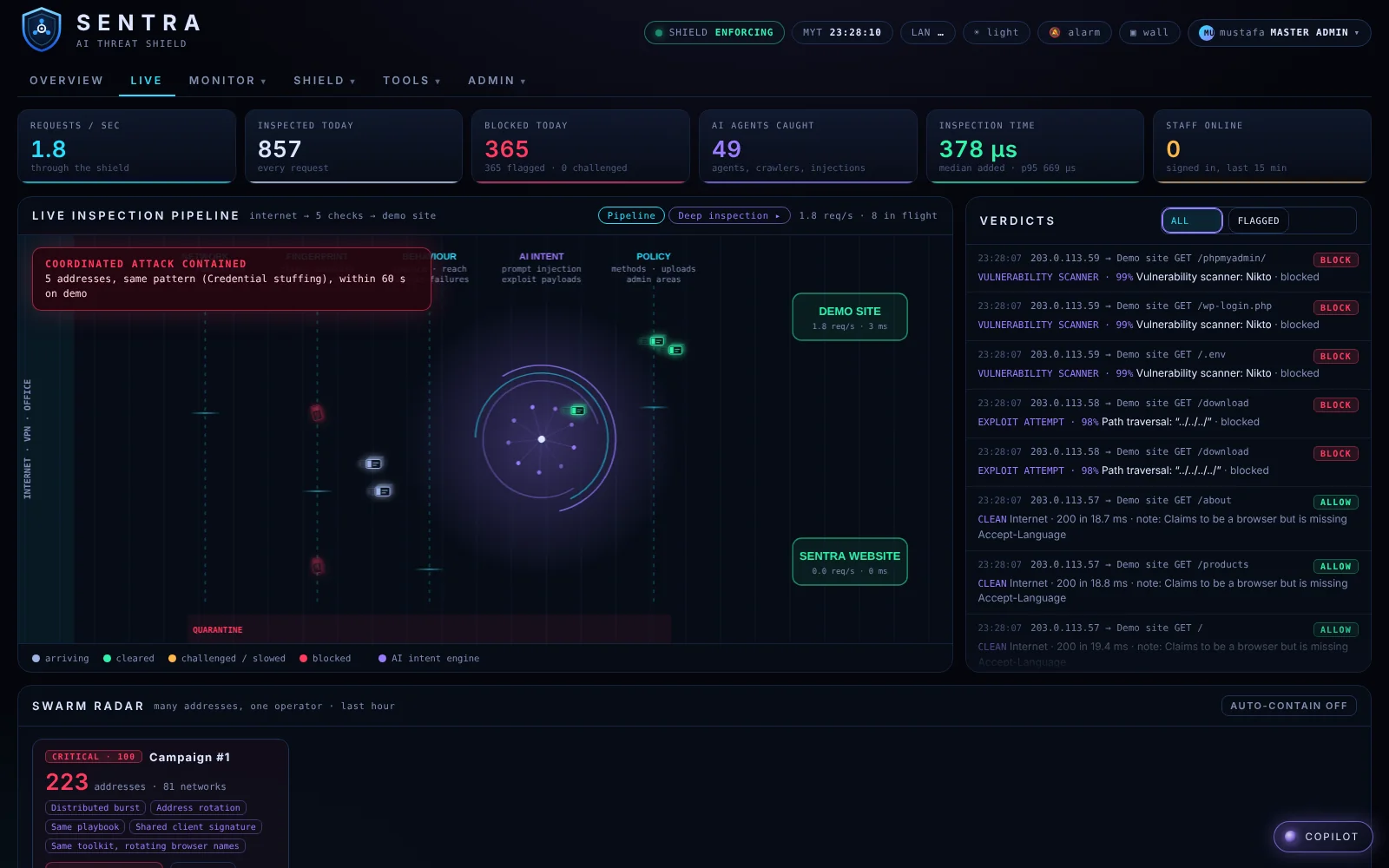
Every request passes five checks (network, fingerprint, behaviour, AI intent and policy) on its way to the site. Each verdict is listed with its reason, and the swarm radar groups many addresses into one campaign.
SENTRA runs where you put it. SHIELD nodes are installed on your own servers, and you decide which customers run where.
Add a server as a SHIELD node with an install command generated by GUARD. It reports in and appears on the radar.
Start a new customer in Monitor mode to see what would be stopped, then switch to Enforce when you're ready.
Every customer has their own firewall and their own dashboard, so one tenant's settings never touch another's.
Tell us what you want to protect. We'll walk you through the consoles and how SENTRA fits your network.
Prefer email? demo@sentra-ai.com