
For telcos, ISPs, MSPs and data centres: the full SENTRA ecosystem. Both shields enforce, GUARD orchestrates customers across your nodes, and VIEW governs every GUARD from one fleet cockpit.
Orchestrated Threat Governance is the SENTRA ecosystem for AI threat protection. Three layers work as one: VIEW governs, GUARD orchestrates, SHIELD enforces. Select a product to see where it sits.
Swipe to explore the diagram
SENTRA VIEW→SENTRA GUARD→SENTRA AI Threat ShieldorNetwork Threat Shield
For telcos and MSPs
Sell clean internet as a service.
SENTRA GUARD is multi-tenant from the start. Each customer gets their own firewall, and you run the whole estate from one console, from onboarding through to billing.
ABOVE IT ALL · SENTRA VIEW
Running more than one GUARD? SENTRA VIEW puts every orchestrator, node and customer in one fleet cockpit.
01
Onboard the customer
Add the customer in GUARD and choose what they need: AI Threat Shield for a website, Network Threat Shield for a DIA line.
02
Spin up their firewall
GUARD provisions a dedicated firewall for that customer on one of your SHIELD nodes.
Per-customer firewallMonitor or Enforce
03
Watch it live
The radar cockpit shows every node's health and bandwidth as it happens, with live threats and alerts beside it.
Node healthBandwidthAlerts
04
Move without disruption
Shift a customer from one node to another seamlessly when you need to rebalance or maintain.
05
License and bill
Licences go through maker-checker approval. Billing and alerts are part of the same console.
Maker-checkerBilling
Example scenarios
How operators put it to work.
Two illustrative scenarios based on common operator models. They are examples, not named customers.
An ISP sells Dedicated Internet Access to business customers and wants a security add-on it can price per line, without building a security operation from scratch.
What SENTRA does
Network Threat Shield nodes run on bare metal in two points of presence, managed from one GUARD per region. Each new customer is onboarded in GUARD and gets a dedicated firewall for their IP block. SENTRA VIEW sits above both GUARDs for the NOC.
The outcome
"Clean internet" becomes a product on the price list, with live health per node, maker-checker licensing and billing in the same console.
Illustrative exampleGUARD · AI Threat Shield · VIEW
An MSP protecting many small business websites
The situation
A managed service provider hosts hundreds of small business sites across two data centres. Most have no firewall and outdated plugins, and every incident lands on the MSP's help desk.
What SENTRA does
Each site gets its own AI Threat Shield firewall and dashboard on shared nodes, provisioned from GUARD. Customers are moved between nodes during maintenance without disruption. VIEW shows both data centres in one cockpit.
The outcome
A protection tier the MSP can sell to every hosting customer, and fewer emergency clean-ups after a breach.
The consoles
See it on screen.
These are the real SENTRA consoles. The figures shown are demo data.
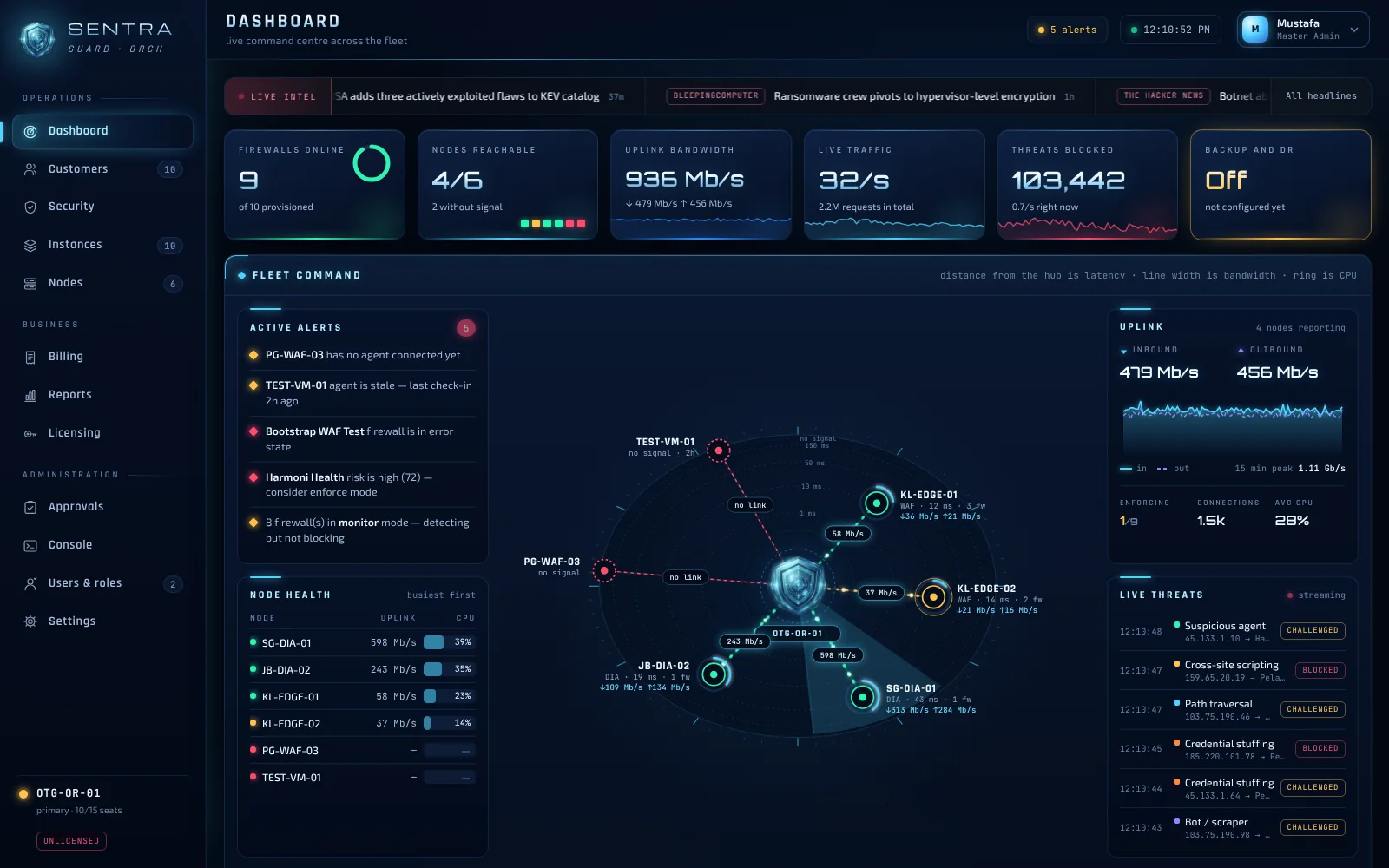
SENTRA GUARD · DASHBOARDDemo data
Fleet command radar
Every node on one radar: distance from the hub is latency, line width is bandwidth, the ring is CPU. Alerts, node health and live threats sit around it.
Deploy on your terms
Your servers. Your network. Your call.
SENTRA runs where you put it. SHIELD nodes are installed on your own servers, and you decide which customers run where.
On your own nodes
Add a server as a SHIELD node with an install command generated by GUARD. It reports in and appears on the radar.
Watch before you block
Start a new customer in Monitor mode to see what would be stopped, then switch to Enforce when you're ready.
Separate by design
Every customer has their own firewall and their own dashboard, so one tenant's settings never touch another's.
# GUARD → Nodes → New install command root@edge-01:~$<install command from your GUARD console> # node reports in · appears on the radar
Next step
See SENTRA on your own traffic.
Book a walkthrough, or start with a free Safety Check of your site.